FPS Function Manager Manual Formula Writing
You can manually edit formulas that are inserted into your Excel® workbook from the Financial Performance Suite (FPS) Function Manager Excel® add-in.
When you edit formulas manually, you must include specific reference values so that the formula pulls the correct data.
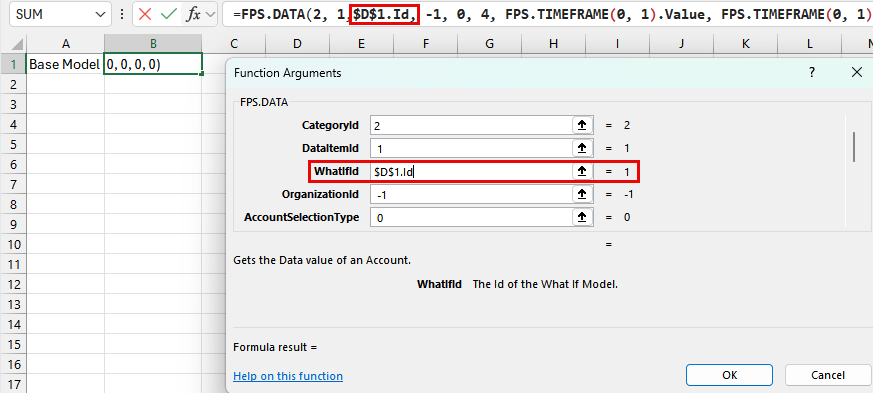
For example, some formula references include an Id value, such as CategoryId, AccountId, and WhatIfId. When you manually replace the ID number with a cell reference, you must add .Id to the end of the reference.
When you manually edit time frame cell references, you must add .Value to the end of the reference.
You can edit formulas from the Formula Bar or the Function
Arguments screen. Select  Function Arguments to open the Function Arguments
screen.
Function Arguments to open the Function Arguments
screen.
Example
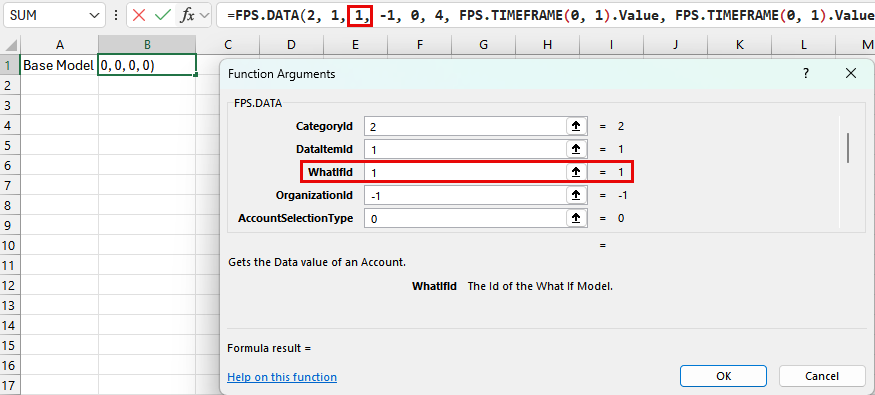
The originally inserted FPS Function Manager formula states that the WhatIfId is 1.
You can edit the WhatIfId to reference another cell, for example, $D$1.Id. Add .Id to the end of the reference to pull the correct data.